
One4Home app icon
Launcher comparison · Updated August 2026

One4Home vs Smart Launcher 6: two complete launchers, two different priorities

Smart Launcher 6 is a mature system built around automatic app categories, modular pages and its Fluid Grid. One4Home emphasizes an ad-free, account-free visual studio where themes, wallpapers, icons, widgets and device layouts are designed together.

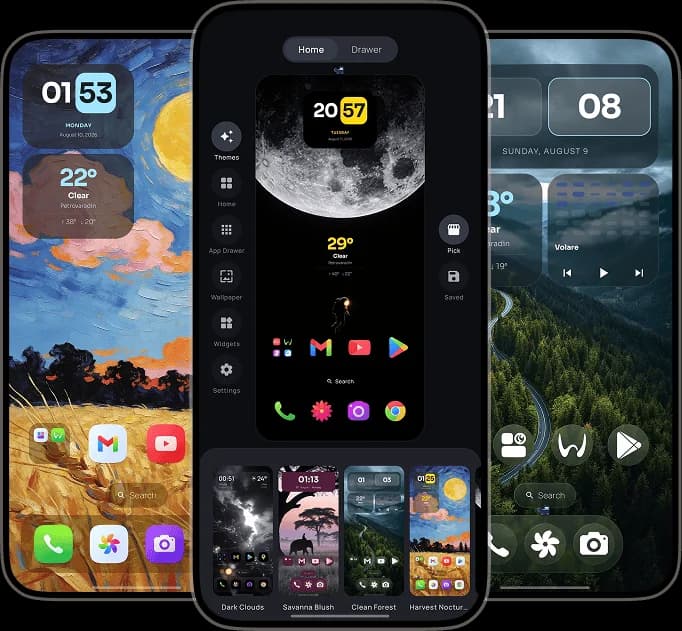
One4Home visual launcher editor and personalized Android home screens
One4Home
No ads · No account
Smart Launcher
A different launcher philosophy
Fact-checked
Official sources linked below
Android
Full home-screen replacements

Which launcher should you choose?

Smart Launcher is stronger when automatic categorization and a long-established modular system lead the decision. One4Home is the more direct fit when you want a visually integrated launcher whose free core remains ad-free and does not ask for an account.

Choose Smart Launcher if

People who want automatic app categorization, a mature modular page system, content feeds and deep home-screen organization.

  • Automatic app categories and a dedicated app page
  • Fluid Grid, icon groups and precise free-form widget placement
  • Modular Home, Search, News and feed pages
  • A mature Pro tier with advanced organization and visual controls
Choose One4Home if

People who want a clean free core with no ads or account, plus curated complete themes and one place to design every launcher surface.

  • No ads and no account in the free core launcher
  • Curated themes that can apply layout, icons, widgets and wallpaper
  • Two independent Home spaces and separate orientation layouts
  • Built-in visual Studio for Home, drawer, widgets, wallpaper and icons

One4Home vs Smart Launcher 6

The same feature label can hide very different design choices. This table compares how each launcher approaches the job.

AreaOne4HomeSmart Launcher
App organizationCustom drawer grids, folders, categories, search and two independent Home spaces.Apps automatically grouped into categories, with editable categories and folders available through paid features.
Home layoutFlexible traditional grids for Home, dock and drawer, with separate portrait and landscape arrangements.Fluid Grid, free-form widget editing, icon groups and a modular multi-page system.
Themes and wallpapersCurated complete setups, selective theme parts, Material colors and integrated wallpapers.Theme editor, ambient theme, fonts, curated wallpapers, icon groups and broad visual controls.
WidgetsStandard Android widgets, built-in widgets, stacks and theme-aware surfaces.Standard and built-in widgets, widget stacks, popup widgets and multiple widget pages, with some options in Pro.
Nova migrationCompatible Nova backup import with a preview; widgets must be added again.Smart Launcher 6.6 also documents Nova backup import for layouts, icons and basic setup.
Foldables and landscapeSeparate portrait and landscape layouts for phones, foldables and tablets.Version 6.6 documents foldable inner-screen and landscape layouts with separate setup support.
Free experienceFree core with no ads or account; optional One4Home Pro.Free version includes ads and feature limits; Smart Launcher Pro removes ads and unlocks more controls.

The differences that actually matter

A feature count cannot tell you how a launcher feels every time you press Home. These choices can.

Automation versus direct authorship

Smart Launcher begins by sorting apps and structuring pages for you. One4Home gives you strong starting themes but leaves the hierarchy of Home, drawer, folders and Spaces under direct control. Smart Launcher reduces setup work; One4Home emphasizes authorship.

Both are broader than simple Nova replacements

Neither product should be reduced to a Nova clone. Smart Launcher has its own category and page model, while One4Home combines a conventional launcher structure with an integrated visual Studio. The comparison is between two complete systems, not two skins.

The free-tier experience is a clear separator

Smart Launcher documents ads and several feature limits in its free version, with Pro removing ads and expanding customization. One4Home keeps the core launcher ad-free and account-free, then reserves advanced gestures, Spaces and expanded theme controls for Pro.

Migration is available on both sides

Smart Launcher 6.6 and One4Home both document Nova backup import. One4Home explicitly previews the imported result and explains that Android widgets must be re-added because widget host IDs cannot move between launchers.

Frequently Asked Questions

Is One4Home better than Smart Launcher 6?

It depends on priorities. One4Home is a better fit for an ad-free, account-free core and complete visual setups. Smart Launcher 6 is a better fit for automatic app categories, mature modular pages and a long-established organization system.

Do One4Home and Smart Launcher support Nova backups?

Yes. One4Home supports compatible Nova backup import and previews the result before applying it. Smart Launcher 6.6 also documents Nova import for layouts, icons and basic setup. Widget handling can still require manual work.

Does Smart Launcher have ads?

Smart Launcher's official free-versus-Pro documentation says the free version includes ads and Pro removes them. One4Home does not show ads in its free core launcher.

Which launcher organizes apps automatically?

Smart Launcher is the stronger choice for automatic organization because its app page sorts apps into categories. One4Home supports folders, categories, search and custom drawer layouts but emphasizes user-controlled organization.

Which launcher supports foldables and landscape layouts?

Both do. One4Home supports separate portrait and landscape layouts for phones, foldables and tablets. Smart Launcher 6.6 documents separate foldable inner-screen and landscape layout support.

Try the launcher that fits your priorities

One4Home is available on Google Play with a free, ad-free core. It is still in public beta, and we are actively improving stability and adding new features.

One4Home is an independent product and is not affiliated with or endorsed by Smart Launcher 6.