

One4Home app icon
Launcher comparison · Updated August 2026

One4Home vs Microsoft Launcher: personal design or Microsoft productivity?

Microsoft Launcher connects the Android home screen to calendar, To Do, Sticky Notes, Microsoft accounts and managed work devices. One4Home centers the experience on personal visual design, with no required account, no ads and a built-in studio for themes, icons, widgets, wallpapers and layouts.

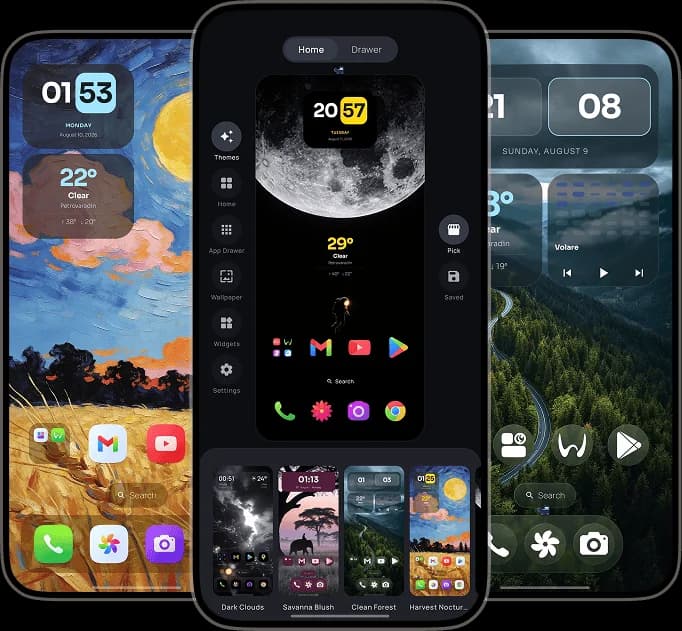
One4Home visual launcher editor and personalized Android home screens
One4Home
No ads · No account
Microsoft Launcher
A different launcher philosophy
Fact-checked
Official sources linked below
Android
Full home-screen replacements

Which launcher should you choose?

Choose Microsoft Launcher when cross-device productivity and work integration are the reason to switch. Choose One4Home when the home screen's look, layout and local personalization are the product—not a gateway to an account ecosystem.

Choose Microsoft Launcher if

People already invested in Microsoft 365, To Do, calendar, Sticky Notes, work profiles or enterprise-managed Android devices.

  • Personalized feed for calendar, To Do and Sticky Notes
  • Microsoft account and work-account integration
  • Enterprise configuration and Android Work Profile support
  • Bing daily wallpapers, icon packs, gestures and backup/restore
Choose One4Home if

People who want the launcher itself to be a personal design space, without signing into an ecosystem or adding a productivity feed.

  • No account required and no advertising
  • Curated complete themes and selective theme-part application
  • Built-in widgets, wallpapers and deep icon controls
  • Separate portrait and landscape layouts for phones, foldables and tablets

One4Home vs Microsoft Launcher

The same feature label can hide very different design choices. This table compares how each launcher approaches the job.

AreaOne4HomeMicrosoft Launcher
Primary purposePersonalize the Android home screen as a complete visual system.Bring Microsoft productivity and cross-device information onto the Android home screen.
AccountNo account required for the launcher or core personalization.Works as a launcher without signing in, but Microsoft recommends personal or work account sign-in for the best integrated experience.
Feed and productivityLauncher-focused search, widgets and optional content surfaces without a required productivity account.Personalized feed for calendar, To Do, Sticky Notes, news and Microsoft services.
Visual personalizationComplete themes, integrated wallpapers, Material colors, icon packs, custom icons and theme-aware surfaces.Custom icon packs, adaptive icons, dark mode, Bing daily wallpapers and home-screen organization.
Widgets and gesturesStandard and built-in widgets, stacks, advanced Pro gestures and two Home spaces.Standard widgets and configurable swipe, pinch and double-tap gestures.
Backup and migrationOne4Home backup/restore plus compatible Nova import with preview.Local or cloud backup/restore and the option to import a current home-screen layout during setup.
Work and enterpriseDesigned primarily for personal Android customization.Supports Android Work Profile and managed home-screen configuration for enterprise devices.

The differences that actually matter

A feature count cannot tell you how a launcher feels every time you press Home. These choices can.

The account changes the value proposition

Microsoft Launcher can operate without sign-in, but its strongest benefits appear when calendar, To Do, Sticky Notes and work data are connected. One4Home does not require an account because its central value is the launcher design experience itself.

Productivity feed versus visual Studio

Microsoft uses a personalized feed to surface information and tasks. One4Home uses Studio to edit Home, drawer, wallpaper, icons, widgets and themes around a live preview. One organizes your work context; the other organizes your visual environment.

Both cover launcher fundamentals

This is not a comparison between a real launcher and a companion app. Both replace the Android home screen and support customization, icon packs, wallpapers, widgets, gestures and backup choices. The difference is where each product invests beyond those basics.

Enterprise support is Microsoft's clear advantage

Microsoft documents work accounts, Android Work Profile and admin-controlled managed home screens. One4Home does not target enterprise deployment; its advantage is a focused personal experience with no required account or advertising.

Frequently Asked Questions

Is One4Home better than Microsoft Launcher?

One4Home is a better fit for visual themes, device-specific layouts and account-free personalization. Microsoft Launcher is a better fit for people who want Microsoft calendar, To Do, Sticky Notes, work accounts and enterprise management on the home screen.

Does Microsoft Launcher require a Microsoft account?

It can be used as a launcher without signing in, but Microsoft recommends signing in with a personal or work account for the best feed and cross-device experience. One4Home requires no account.

Do both launchers support icon packs and wallpapers?

Yes. Microsoft Launcher supports custom icon packs, adaptive icons and Bing or personal wallpapers. One4Home supports installed icon packs, per-app custom images, integrated wallpapers, Material colors and complete themes.

Which launcher is better for work profiles?

Microsoft Launcher is the stronger choice for work profiles and managed business devices because Microsoft officially documents Android Work Profile and enterprise home-screen configuration.

Can One4Home import a Microsoft Launcher backup?

One4Home currently documents compatible Nova Launcher backup import, not Microsoft Launcher cloud backups. When switching from Microsoft Launcher, plan to rebuild the layout manually and add widgets again.

Try the launcher that fits your priorities

One4Home is available on Google Play with a free, ad-free core. It is still in public beta, and we are actively improving stability and adding new features.

One4Home is an independent product and is not affiliated with or endorsed by Microsoft Launcher.