 One4HomeGet the app
A Nova Launcher alternative that goes beyond the launcher
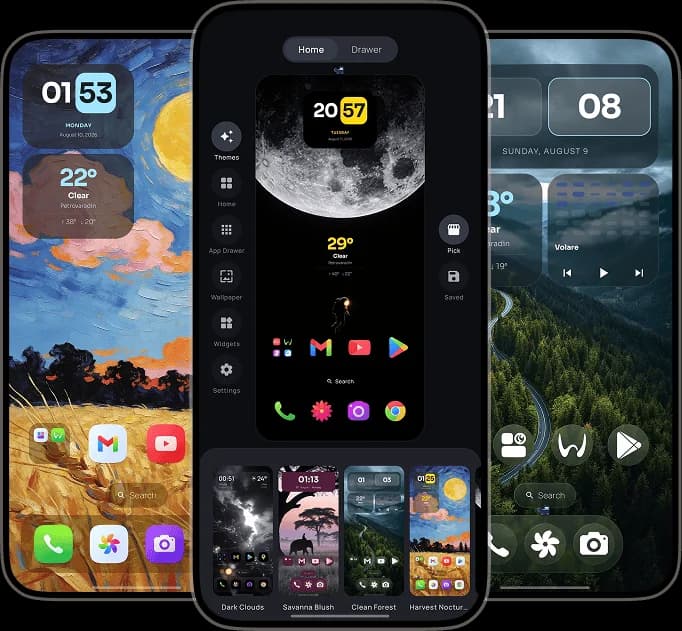
Import a compatible Nova backup, then build your Android home screen with themes, widgets, icon packs, wallpapers, flexible grids and layouts made for phones, foldables and tablets. No ads. No account.
Is One4Home a Nova Launcher alternative?
Yes. One4Home is a complete Android home-screen launcher for the familiar essentials—grids, folders, a dock, app drawer, widgets, icon packs and fast search—plus integrated themes, wallpapers, built-in widgets and separate layouts for different screens and orientations.
A compatible Nova Launcher backup can bring supported apps, folders, pages and positions into One4Home, so you do not have to rebuild everything from an empty screen. One4Home is designed as its own broader personalization experience, not as a Nova-style copy.
What moves over from a Nova backup?
One4Home imports what Android can safely carry across and tells you where a manual step is still required.
| Nova backup item | What One4Home does |
|---|---|
| Home pages, apps and positions | Imported where they fit the selected One4Home grid. Items outside the grid move to the first free space on that page. |
| Folders and folder contents | Imported for apps currently installed on the device. |
| Dock | Imported with its supported apps and positions. |
| Widgets | Not transferred. Android widget IDs belong to Nova's widget host, so widgets must be added again in One4Home. |
| Apps that are not installed | Skipped instead of leaving broken shortcuts behind. |
| Before anything changes | One4Home shows an import preview for you to review before applying it. |
How to move from Nova Launcher to One4Home
Keep the original backup until you have reviewed and applied the One4Home preview.
Create a Nova backup
In Nova Settings, create a backup and save the .novabackup file somewhere available to Android's file picker.
Open One4Home Launcher Settings
Long-press an empty area of your One4Home screen, then choose Launcher Settings.
Go to the Setups section
In Studio, open Settings, choose Setups, then find Import from another launcher.
Pick the backup file
Tap Pick file and select the compatible .novabackup file you exported from Nova Launcher.
Review before applying
Check the One4Home preview, apply the imported layout when it looks right, then add your widgets again.
More than a Nova-style replacement
Keep the control you expect from an Android launcher and add a complete visual studio around it.
Complete themes, not presets alone
Start with a curated look, apply only the parts you want, or save a complete setup of your own.
Built-in and Android widgets
Use standard third-party widgets alongside One4Home clock, weather, battery and calendar widgets.
Icon packs and custom icons
Apply an installed Android icon pack or assign a custom PNG, WebP or JPEG to an individual app.
Layouts for every screen
Tune Home, dock and app-drawer grids with separate portrait and landscape layouts for phones, foldables and tablets.
Wallpapers inside the launcher
Choose wallpapers, build around Material colors and combine the background with the rest of your setup.
Search, gestures and Spaces
Find apps and settings quickly, then go further with optional Pro gestures and two independent Home spaces.
Frequently Asked Questions
Is One4Home a Nova Launcher alternative?
Yes. One4Home is a full Android home-screen launcher with grids, folders, a dock, an app drawer, widgets, icon packs and search. It also adds integrated themes, wallpapers, built-in widgets and device-specific layouts instead of trying to be a Nova-style clone.
Can One4Home import a Nova Launcher backup?
Yes. One4Home can read compatible .novabackup files and import supported home pages, apps, folders, dock items and positions. It shows a preview before you apply the result.
Will my Nova widgets transfer automatically?
No. Android assigns widgets to the launcher that created them, so Nova widget IDs cannot be reused by One4Home. Your layout can still be imported, but widgets need to be added again.
Is One4Home free?
Yes. The core launcher includes Home, the app drawer, folders, widgets, icon packs, search and core customization. One4Home Pro adds advanced gestures, Spaces, expanded theme controls, daily wallpaper automation and new curated themes.
Does One4Home contain ads or require an account?
No. One4Home contains no advertising and does not require an account.
Is One4Home still in development?
Yes. One4Home is a production release under active development. We are continuing to improve stability and add new features, so users can expect the launcher to keep evolving.
Bring your setup. Build what comes next.
Try the free One4Home core on Android 10 and newer. No ads, no account, and no need to begin with a blank home screen.
One4Home is an independent product and is not affiliated with or endorsed by Nova Launcher.