

One4Home app icon
Launcher comparison · Updated August 2026

One4Home vs Niagara Launcher: visual freedom or focused simplicity?

Both launchers are ad-free and highly personal, but they solve opposite home-screen problems. Niagara reduces the launcher to a fast, one-handed app list; One4Home gives you a visual studio for grids, themes, widgets, wallpapers and device-specific layouts.

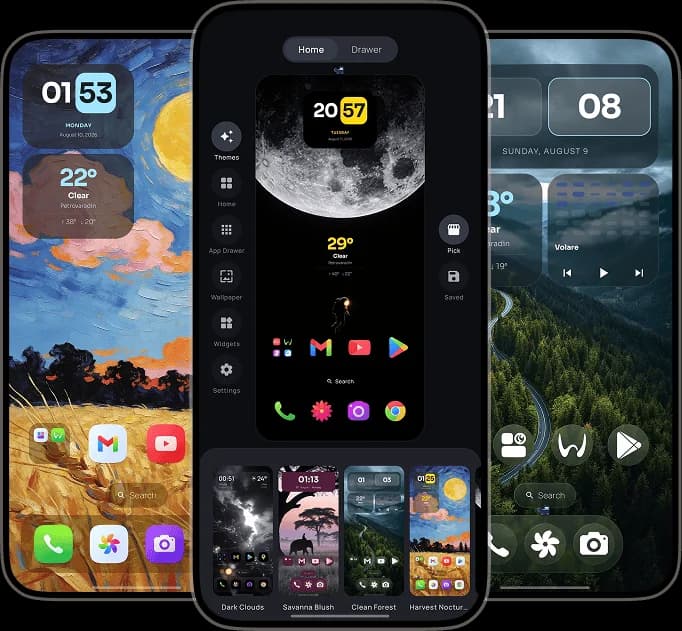
One4Home visual launcher editor and personalized Android home screens
One4Home
No ads · No account
Niagara
A different launcher philosophy
Fact-checked
Official sources linked below
Android
Full home-screen replacements

Which launcher should you choose?

Choose Niagara if removing home-screen structure is the goal. Choose One4Home if you want to keep the familiar Android launcher model and gain deeper control over how every part of it looks and behaves.

Choose Niagara if

People who want a calm, one-handed list that keeps favorite apps and notifications close without a traditional icon grid.

  • A distinctive alphabetical list built for one-handed navigation
  • A deliberately low-clutter interface with app pop-ups
  • Built-in Anycons, wallpapers, widgets and ready-made themes
  • An ad-free free tier with optional Niagara Pro
Choose One4Home if

People who enjoy building a complete visual setup with multiple pages, flexible grids, folders, widgets, icon packs, themes and wallpapers.

  • Traditional multi-page Home, dock and app drawer grids
  • Curated themes that can be applied completely or piece by piece
  • Standard Android widgets plus built-in One4Home widgets
  • Separate portrait and landscape layouts for phones, foldables and tablets

One4Home vs Niagara Launcher

The same feature label can hide very different design choices. This table compares how each launcher approaches the job.

AreaOne4HomeNiagara
Core home-screen modelMulti-page grids with a dock, folders, app drawer and visual Studio.A streamlined alphabetical list with favorites and one-handed navigation.
WidgetsStandard Android widgets, built-in widgets, stacks and flexible grid placement.A focused widget area, Pro widget stacks and widgets inside app pop-ups.
Themes and wallpapersCurated complete setups, selective theme parts, saved themes and integrated wallpapers.Ready-made and community themes, wallpapers, Anycons, fonts and theme colors.
App organizationTraditional drawer grids, folders, categories and two independent Home spaces.Alphabetical navigation with favorites, app pop-ups and pop-up folders.
Large screens and rotationSeparate portrait and landscape layouts for phones, foldables and tablets.Foldable support while preserving Niagara's list-first design.
Ads and accountNo ads and no account required.Ad-free in both free and Pro versions; no account required for the core launcher.
Current modelFree core with optional One4Home Pro; currently in public beta.Free core with optional Niagara Pro; established and continuously developed.

The differences that actually matter

A feature count cannot tell you how a launcher feels every time you press Home. These choices can.

List-first versus canvas-first

Niagara treats the home screen as a fast path to apps and notifications. One4Home treats it as a configurable canvas. The right choice depends less on the number of features and more on whether you want to remove the grid or take control of it.

Two valid approaches to widgets

Niagara keeps widgets compact through stacks and pop-ups, with several options tied to Pro. One4Home lets widgets participate in the broader grid and theme system alongside its built-in clock, weather, battery and calendar widgets.

Ready-made looks with different goals

Both products now offer ready-made themes. Niagara themes preserve its restrained list interface; One4Home themes can reshape a fuller home-screen setup, including layout, icons, widgets and wallpaper, while letting you apply only selected parts.

The privacy decision is easy

Neither launcher needs to fund the core experience with ads. One4Home also requires no account, so this comparison is mainly about interface philosophy rather than choosing between privacy and customization.

Frequently Asked Questions

Is One4Home better than Niagara Launcher?

It depends on the home screen you want. One4Home is a better fit for traditional grids, multiple pages, folders, integrated themes and detailed layouts. Niagara is a better fit for a minimal, one-handed alphabetical list with fewer elements on screen.

Do One4Home and Niagara Launcher support widgets?

Yes. One4Home supports standard Android widgets, built-in widgets and stacks within its grid system. Niagara supports a focused widget area, with multiple-widget stacks and popup widgets available through Niagara Pro.

Which launcher has ads?

Neither One4Home nor Niagara Launcher shows ads in its free launcher experience. Both offer optional paid upgrades for additional features.

Can One4Home import a Niagara Launcher setup?

One4Home currently documents compatible Nova Launcher backup import, not Niagara backup import. When moving from Niagara, plan to rebuild the layout while keeping your installed icon packs and Android widgets available to add again.

Which launcher is better for foldables and tablets?

Both support modern device shapes. One4Home is the stronger fit when you want separately configurable portrait and landscape layouts, while Niagara keeps its consistent list-first interaction across devices.

Try the launcher that fits your priorities

One4Home is available on Google Play with a free, ad-free core. It is still in public beta, and we are actively improving stability and adding new features.

One4Home is an independent product and is not affiliated with or endorsed by Niagara Launcher.