

One4Home app icon
Launcher comparison · Updated August 2026

One4Home vs Lawnchair: a visual studio or an open Pixel-style launcher?

Lawnchair starts from Android's Launcher3 and brings Pixel-style behavior, Material theming and open-source development. One4Home starts from a complete personalization studio, combining familiar launcher controls with curated themes, wallpapers and built-in widgets.

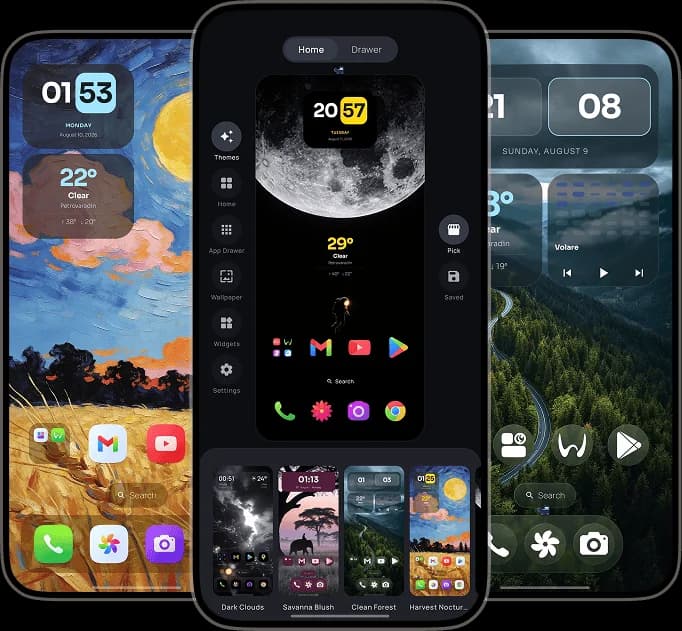
One4Home visual launcher editor and personalized Android home screens
One4Home
No ads · No account
Lawnchair
A different launcher philosophy
Fact-checked
Official sources linked below
Android
Full home-screen replacements

Which launcher should you choose?

Choose Lawnchair for an open-source Launcher3 foundation and Pixel-like behavior. Choose One4Home when complete visual setups and a broader built-in personalization system matter more than closely following the Pixel Launcher model.

Choose Lawnchair if

Android enthusiasts who want a free, open-source, Pixel-inspired launcher and are comfortable choosing between stable beta and development builds.

  • Free and open-source, based on Android's Launcher3
  • Pixel-style features with Material 3 Expressive theming
  • Global search plus icon, font and color customization
  • Optional QuickSwitch integration for rooted devices
Choose One4Home if

People who want a Google Play launcher with a guided visual editor, complete themes, integrated content and layouts tailored to different devices and orientations.

  • Curated themes and selective theme-part application
  • Integrated wallpapers and built-in widgets alongside Android widgets
  • Separate portrait and landscape layouts for multiple device types
  • Compatible Nova backup import with a preview before applying

One4Home vs Lawnchair

The same feature label can hide very different design choices. This table compares how each launcher approaches the job.

AreaOne4HomeLawnchair
Design foundationA custom visual Studio built around complete home-screen personalization.An open-source Launcher3 base that ports Pixel Launcher ideas and adds customization.
ThemesCurated full setups, saved themes and control over which theme parts are applied.Material 3 colors, wallpaper/system accents, fonts, themed icons and icon packs.
WidgetsStandard Android widgets, built-in widgets, stacks and theme-aware surfaces.Standard widgets plus At a Glance support and optional Smartspacer integration.
SearchApps and launcher settings, with optional local contact matching.Apps, contacts and web results, with providers that can vary by build.
Recents integrationUses the standard Android launcher boundaries without requiring root-specific setup.QuickSwitch can provide deeper Recents integration on supported Android versions, but requires root.
Distribution and developmentAvailable on Google Play in public beta with an actively evolving feature set.Official builds come from several sources; Lawnchair 15 Beta is recommended for regular users while Lawnchair 16 remains in development.
Ads and accountNo ads and no account required.Free and open-source without an account-driven launcher experience.

The differences that actually matter

A feature count cannot tell you how a launcher feels every time you press Home. These choices can.

Pixel familiarity versus a new design system

Lawnchair intentionally feels close to Google's Launcher3 and Pixel Launcher conventions. One4Home keeps familiar Android concepts but puts them inside its own Studio, surfaces and theme system. Familiarity favors Lawnchair; a more distinct visual workflow favors One4Home.

Open source is a real Lawnchair advantage

Lawnchair publishes its code and development openly, which is meaningful for users who value inspection, community builds and modding. One4Home is proprietary, with its trust proposition centered on no ads, no required account and clear public product documentation.

Themes mean different things

Lawnchair offers rich colors, fonts, themed icons and icon-pack controls within a Pixel-like shell. One4Home themes are designed as complete setups that can include layout, icons, widgets and wallpaper, then be applied wholly or selectively.

Both products are still moving

One4Home is explicitly in public beta. Lawnchair also has multiple active beta and development tracks, and its own project recommends a Lawnchair 15 Beta build for regular users instead of the Lawnchair 16 development branch. Build choice matters on both sides.

Frequently Asked Questions

Is One4Home better than Lawnchair?

One4Home is a better fit for complete themes, integrated wallpapers and widgets, and separate device layouts. Lawnchair is a better fit if open-source software, Pixel-style behavior and optional rooted QuickSwitch integration are priorities.

Is Lawnchair open source?

Yes. Lawnchair is a free, open-source Android home app based on Launcher3. Its official GitHub project publishes the code, releases and development status.

Do both launchers support icon packs?

Yes. Both One4Home and Lawnchair support installed Android icon packs and per-app icon customization. Their themed-icon and tinting approaches differ.

Which launcher is more stable?

Both require attention to version choice. One4Home is in public beta. Lawnchair's official project recommends Lawnchair 15 Beta for regular users while its Lawnchair 16 branch remains under active development and may break.

Can One4Home import a Lawnchair backup?

One4Home currently documents compatible Nova Launcher backup import, not Lawnchair backup import. A move from Lawnchair should be treated as a manual layout rebuild.

Try the launcher that fits your priorities

One4Home is available on Google Play with a free, ad-free core. It is still in public beta, and we are actively improving stability and adding new features.

One4Home is an independent product and is not affiliated with or endorsed by Lawnchair.